Current Position : Acebyte > Download Acebyte Utilities > Acebyte Utilities version history
Download Acebyte Utilities
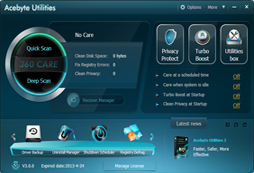
Acebyte Utilities - Version History
Acebyte Utilities V3.1.2.0 - Auhust. 9, 2013
* [New]Fix some bugs
* [New]Fix some bugs
Acebyte Utilities V3.0.7 - July. 18, 2013
* [New]Fix some bugs
* [New]Fix some bugs
Acebyte Utilities V3.0.6 - Nov. 5, 2012
* [New]Add two versions: Spanish and Portuguese
* [New]Fix some bugs
* [New]Add two versions: Spanish and Portuguese
* [New]Fix some bugs
Acebyte Utilities V3.0.4
* [New]Add two versions: Chinese and Japanese
* [New]Change its trial version from full-functional 15-day trial to no time limit free trial on part of the fucntions
* [New]Add two versions: Chinese and Japanese
* [New]Change its trial version from full-functional 15-day trial to no time limit free trial on part of the fucntions
Acebyte Utilities V3.0.3
* [New] Support user feedback
* [New] Support to send error report
* [New] Add "Windows Fixes" and error reports in Private Protect mode
* [Fix] Fix some bugs on Turbo Boost, interface, sweep privacy, registry cleaner and more
* [New] Support user feedback
* [New] Support to send error report
* [New] Add "Windows Fixes" and error reports in Private Protect mode
* [Fix] Fix some bugs on Turbo Boost, interface, sweep privacy, registry cleaner and more
Acebyte Utilities V3.0.2
* [New] Support to diagnose PC health
* [New] Support to maximum every feature in 360Care
* [New] Support to export the scan results in 360Care as HTML file
* [Improve] Improve the software CPU usage and initialization time
* [Fix] Fix some bugs
* [New] Support to diagnose PC health
* [New] Support to maximum every feature in 360Care
* [New] Support to export the scan results in 360Care as HTML file
* [Improve] Improve the software CPU usage and initialization time
* [Fix] Fix some bugs
Acebyte Utilities V3.0.1
* [New] Improve the launch speed
* [New] Fix the bugs in Autocare feature
* [New] Improve the launch speed
* [New] Fix the bugs in Autocare feature
Acebyte Utilities V3.0.0
* [New] Offer a new and more user-friendly interface
* [New] Main interface no longer depends on the Internet Explorer Engine
* [New] Support to complete the quick scan and deep scan by just 1 click
* [New] Every built-in utility can complete the auto PC maintenance
* [New] Newly add specified progress to complete the auto PC care
* [New] Fix the interface bug in Disk Defragment feature
* [New] Improve the registry cleaner feature
* [New] Improve the privacy sweep feature
* [New] Newly add the waiting start interface in Uninstaller Manager
* [New] Offer more professional solutions during the cleanup
* [New] Fix the Unlocker bug in Windows 64bit OS
* [New] Fix bugs on Undelete
* [New] Offer a new and more user-friendly interface
* [New] Main interface no longer depends on the Internet Explorer Engine
* [New] Support to complete the quick scan and deep scan by just 1 click
* [New] Every built-in utility can complete the auto PC maintenance
* [New] Newly add specified progress to complete the auto PC care
* [New] Fix the interface bug in Disk Defragment feature
* [New] Improve the registry cleaner feature
* [New] Improve the privacy sweep feature
* [New] Newly add the waiting start interface in Uninstaller Manager
* [New] Offer more professional solutions during the cleanup
* [New] Fix the Unlocker bug in Windows 64bit OS
* [New] Fix bugs on Undelete
Acebyte Utilities V2.3.2
* [New] Newly add Disk Cleaner feature in Optimize under Utilities Box option
* [New] Newly add Shortcut Cleaner feature in Optimize under Utilities Box option
* [New] Newly add Disk Cleaner feature in Optimize under Utilities Box option
* [New] Newly add Shortcut Cleaner feature in Optimize under Utilities Box option
Acebyte Utilities V2.2.1
* [Update] Fix the bug on disk defragmentation crashes
* [New] Add process bar on Restore Manager
* [Update] Fix the bug that the icons on desktop have been corrupted when cleaning Registry
* [New] Add Registry Defragment
* [Update] Renew interface on Duplicate File Scanner
* [New] Add more items on Privacy Cleaner
* [Update] Remove title from Startup Manager
* [Update] Support to directly delete privacy files found by Privacy Cleaner from PC
* [Update] Remove Registry Manager from 360 Care option
* [Update] Fix the bug on disk defragmentation crashes
* [New] Add process bar on Restore Manager
* [Update] Fix the bug that the icons on desktop have been corrupted when cleaning Registry
* [New] Add Registry Defragment
* [Update] Renew interface on Duplicate File Scanner
* [New] Add more items on Privacy Cleaner
* [Update] Remove title from Startup Manager
* [Update] Support to directly delete privacy files found by Privacy Cleaner from PC
* [Update] Remove Registry Manager from 360 Care option
Acebyte Utilities V2.1.2
* [New] Newly support digital signature
* [Update] Change units shown in turbor boost and reg defrag
* [Update] Fix the bug on cloned file scanning
* [Update] Fix the bug that the program crashes when restoring
* [New] Newly support digital signature
* [Update] Change units shown in turbor boost and reg defrag
* [Update] Fix the bug on cloned file scanning
* [Update] Fix the bug that the program crashes when restoring
Acebyte Utilities V2.1.1
* [Update] Correct some texts on interface and fix bugs in "registry module".
* [Update] Fix the incorrect display of buttons and detailed info on "drive backup"
* [Update] Correct some texts on interface and fix bugs in "registry module".
* [Update] Fix the incorrect display of buttons and detailed info on "drive backup"
Acebyte Utilities V2.1.0
* [New] Empty folder scanner: scan to find out and delete empty folders from specified hard drive
* [New] Auto shutdown and Restart: shut down or restart computer automatically at preset time
* [New] Top File Finder: Scan top files or lately-changed files
* [Update] Conver dll files to exe format
* [Update] Update the interfaces and functions of file encryption, file shredder and file splitter
* [Update] Update interfaces of some functions
* [New] Empty folder scanner: scan to find out and delete empty folders from specified hard drive
* [New] Auto shutdown and Restart: shut down or restart computer automatically at preset time
* [New] Top File Finder: Scan top files or lately-changed files
* [Update] Conver dll files to exe format
* [Update] Update the interfaces and functions of file encryption, file shredder and file splitter
* [Update] Update interfaces of some functions
Acebyte Utilities V2.0.5
* [Update] Deleted files not going to Recycle Bin
* [Update] Deleted files not going to Recycle Bin
Acebyte Utilities V2.0.4
* [Update] Fix the problem that the refreshing of process management list is slow
* [Update] Fix the problem that the refreshing of process management list is slow
Acebyte Utilities V2.0.3
* [New] It shows in the memory manager how much space is released after cleanup
* [New] The number at memory chart shows the physics memory
* [New] A shortcut dialog box added to 360 Care for cleaning registries
* [Update] Profound cleaning of registries
* [Update] Control widget of list more efficient
* [Update] Fix the bug when uninstall
* [Update] Modify the displaying way of IE history results in privacy scanning module
* [Update] Change the location where the file dump is stored
* [Update] Keep the lately scanned file cleaned up by registry
* [Update] Fix the but that Dialog Recover Box cannot be closed
* [New] It shows in the memory manager how much space is released after cleanup
* [New] The number at memory chart shows the physics memory
* [New] A shortcut dialog box added to 360 Care for cleaning registries
* [Update] Profound cleaning of registries
* [Update] Control widget of list more efficient
* [Update] Fix the bug when uninstall
* [Update] Modify the displaying way of IE history results in privacy scanning module
* [Update] Change the location where the file dump is stored
* [Update] Keep the lately scanned file cleaned up by registry
* [Update] Fix the but that Dialog Recover Box cannot be closed
Do you have a previous version of Acebyte Utilities but need the installation file again? No problem!
Acebyte Utilities V3
Acebyte Utilities V2
Acebyte Utilities V1
Acebyte Utilities V3
Acebyte Utilities V2
Acebyte Utilities V1

-
Get Acebyte Utilities Professional
You will enjoy more features as following:
-
- Quick or deep care for your PC
- Deeply clean Windows Registry
- Speed up internet connection
- Compact the Windows Registry
- Active and deactive context menu
- Backup system driver files
- Automatically care for PC
- Turbo boost your PC
- Automatically protect your privacy
- Search for cloned file
- Free technical support
- Fast and automatic updating
Acebyte Utilities
Register Cleaner
Useful Links
Hot Tags
Acebyte | Affiliate & Partners | Links | Sitemap | Privacy | Terms of Use | Contact us
Copyright © Acebyte. All rights reserved
Copyright © Acebyte. All rights reserved