


Download Acebyte Utilities, Begin 100% Free & Safe Scan Now!
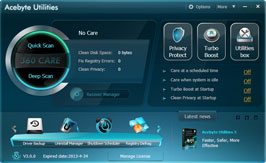
Acebyte Utilities is an advanced multi-language computer maintenance tool in pc diagnosis and repair. It can do a complete scan of the pc errors such as system slowdown, freezing, crashing and deadlock. Safely optimize the speed of the system and set your PC in a peak performance!
More than 20+ useful utilities like Startup Manager, uninstall manager, process manager, memory manager, etc. Besides monitoring the startup & uninstall programs, it also optimizes network speed, disk, desktop, files, system and memory to achieve the maximum performance.
About Acebyte Utilities
 Current Version: 3.0.4
File Size: 14.9M
Platform: Windows XP, Windows Vista, Windows 7, Windows 8
Release Date: July 31, 2012
One-click Fix: Blue screens, freezing, crashing, error messages, slow computer etc.


To make your PC run more smoothly and efficiently without any error

- Magically Speed up Your Computer and Internet
-
Clean up registry, remove the unnecessary and invalid entries, delete histories, temp files and empty Recycle Bin
Diagnose & repair all issues slowing down your computer
Optimize your system and restore IE to its default settings
Tune up and speed up your computer and Internet

- Identify and Fix all PC Errors Safely and Efficiently
-
With Acebyte Utilities, all identified errors will be fixed or removed safely. So you will no longer suffer in such confusing error messages.
It can detect clutters, hidden files, broken shortcuts, common message errors, file association problems, registry errors, corrupted paths, duplicate entries, invalid uninstallers and hard drive problems, etc.

- Quickly Clean out System Junks and Clutters
-
Clean up disk: Acebyte Utilities can help you clean up Windows registries, error DLL messages, invalid context menus causing your PC being overloaded. Therefore you'll enjoy a more spacious PC.
Analyze memory usage and delete data: Clean and optimize your system memory to make your Windows faster.

- Keeps your PC running at peak performance
-
Defrag disk to speed up data transfer
Optimize file system to access into files faster
Clean up hard drive to gain more available disk space
Manage start-up programs to accelerate system startup
Fix invalid registry entries & shortcuts to prevent crashing or freezing

- Prevent Private Information Being Leaked out
-
Delete History: remove all unwanted history tracks, including browsing histories, search histories, viewed pictures, documents and videos etc.
Encrypt File: protect your files and folders from unauthorized viewing.
Shred File: delete files permanently from your hard drive beyond any recovery

- Backup & Restore
-
Restore IE settings- you can instantly restore IE to its default settings when your IE browser is malicious modified or Internet accessing is in trouble.
Drive Backup- offer complete system backup and restore programs to prevent losing your data.
Why use Acebyte Utilities?
- Superfast Scanning Speed
Acebyte Utilities has two scan modes (Quick Scan and Deep Scan) to scan your desired items and areas in a few seconds. - Professional Error Fix
Acebyte Utilities can detect and fix all common Windows errors effectively to keep your PC safe, error-free, and running at top speed! After all, aren't these the things that you care about the most? - 20+ Built-in PC Optimizing Tools
Acebyte Utilities contains 20+ built-in computer optimization tools, like Disk Cleaner, Registry Defrag, Registry Cleaner, Driver Backup, 360 Care, Startup Manager, File Encrypter, and more. - 100% Safe to Run
Acebyte Utilities is 100% clean software to run safely on your computer, no spyware, adware or virus. - Easy to Use
Acebyte Utilities has simple and intuitive interface which makes its every built-in tool easy to use for even the newbie. - Auto Updated
Acebyte Utilities reminds users of every update automatically, to keep your computer always running faster at peak performance. - Free Expert Technical Support
Receive free dedicated technical support (365x 7/24) from our professional team.
Acebyte Utilities Awards




-
Quick Scan
- Quick scan computer for system errors or browser viewing histories, invalid files, etc. without downloading anything..

-
Deep Scan
- Deep scan your crash or freezing computer to speed up your computer or even eliminate security risks

-
Driver Backup
- Efficient driver backup software to backup Windows device drivers thus they can be restored when required using the software.

Protect Privacy
- Quickly and completely clean up all your tracks on computer or Internet or other applications to keep your privacy


-
Uninstall Manager
- Uninstall Manager is the program that lets you safely remove unwanted software and return your system to its original state

-
Process Manager
- An enhanced task manager provides advanced information about programs and processes running on the computer

-
Shutdown Scheduler
- Shut down your computer automatically at a specified time by scheduling power management tasks.

-
Disk Defragmenter
- Fast and safe defragment your hard disks and optimize your file system to speed up your computer

-
Disk Cleaner
- A small, fast and safe disk cleaner utility to detect and delete all types of junk files to free up hard disk space

-
Disk Check
- Scan and check your hard disk drives for errors and repair disk problems to prevent you from computer crashes or freezing

-
Registry Cleaner
- Scan your Windows registry and fix registry errors causing system slowdown to optimize your PC performance

-
Registry Defrag
- Keep your registry defragmented and improve your computer performance by freeing up memory your registry takes up

-
Context Menu Fixer
- Fix the Windows context menu problems which result in right-click slow on Windows XP/Vista/7

-
Shortcut Cleaner
- Scan to find all invalid or useless shortcuts on your computer and repair or delete them to improve your computer performance

-
Undelete Deleted Files
- Restore deleted files, including those removed from Windows Recycle Bin to recover your important files

-
Unlock Locked Files
- Allow to unlock files or folders locked by system or other programs and help to rename, move or delete locked resources

-
File Shredder
- Give you a simple way to shred and permanently remove unwanted files from your computer beyond recovery

-
File Encryption
- Encrypt your important files to protect your files from unauthorized viewing, or decrypt the encrypted files easily

-
Cloned File Finder
- A fast and easy to use utility to find out duplicated or cloned files or folders in your hard disks to free hard disk space

-
File Splitter
- Split or divide any file into pieces of any size and later reconstruct the pieces to form the original file
-
Empty Folder Finder
- Quickly find empty folders, show you a preview of its contents (for safety), and give you the option to delete those folders
-
Top File Finder
- Find files in specified types, files of large sizes or recently modified files and delete them to make your computer run faster
Copyright © Acebyte. All rights reserved