If you have deleted files from your hard drive and emptied your Recycle Bin after that, don’t worry! Acebyte Utilities, one of the best computer optimizing and maintenance tool, gives you an easy access to recover the deleted files on your Windows computer.
The following will let you know how to recover deleted files with this most effective file recovery software.
How files are deleted from your computer
When you press Delete key or right click the specified file and choose Delete to delete files from your computer, it does not mean you have deleted it from your computer really. You just have removed it from the directory of files in the saving folder. It is just like that you only remove the name of a chapter from the index of a book, but the content of the chapter still remains.
For Windows computer users, if they choose to delete some files from their computer, it means they move the indicated files into the Recycle Bin. So, if you want to retrieve your deleted files, just open the Recycle Bin. If you find the deleted files in the Recycle Bin, just right click the delete files and select Restore to move your deleted files back to its original saving location on your hard drive.
Empty the Recycle Bin
If you have emptied your Recycle Bin after deleting files, do not panic. For it is still possible to be recovered. For, even if you empty the Recycle Bin, your deleted files are still not really deleted. They may still exist somewhere in your hard drive. With the help of some deleted file recovery tool like Acebyte Utilities, you can recover the deleted files easily.
How to recover deleted files
Step 1: Launch Acebyte Utilities
Free download the deleted file recovery software on Windows Acebyte Utilities, install and launch it.
Step 2: Activate Undelete feature
Click button in main interface of Acebyte Utilities, to go to “Utilities” window as below:
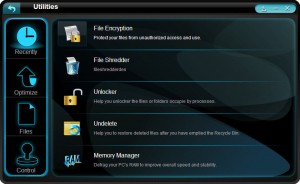
Select “Files” and click “Undelete” to open “Acebyte Undelete” box:
Step 3: Get started on undeleting the deleted files by buttons below:
 : drop down to choose the local area you want to scan
: scan and preview all files you have found
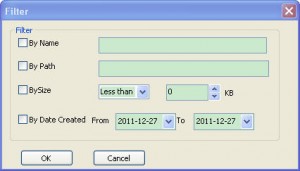
: press to open Filter box to find your deleted file that you want to recover directly:
: click to recover the deleted files back to their original locations.